

Quick answer
Keep the questions, answers and sources when checking what AI says about your business. The method here produces comparable observations without treating a small sample as an overall ranking.
Want to examine a real report?
Explore Breach ProWould an AI assistant suggest your business to a potential customer? And if it did, would it describe your services correctly?
You can check with five customer questions, two assistants and two runs. Save the answers, open their sources and choose one thing to improve. These twenty observations can reveal missing or incorrect information, though they cannot establish your “AI ranking.”
1. Reduce the influence of your history
Choose one service, customer type, market and language. Keep them consistent throughout the test.
If you often discuss your business with an assistant, use its non-personalized temporary or incognito mode. You want to check what it finds without benefiting from your previous conversations.
On the web, start a new chat and look for these controls. Labels can vary with the app, language and account.
- ChatGPT: Select Temporary, then choose Unpersonalized before your first message. Temporary alone can still use personalization. Official guide and screenshot.
- Claude: Outside a project, click the ghost icon at the top right. Check for the Incognito chat label. Memory is excluded, but profile preferences can still apply. Check any that identify your business. Official guide.
- Gemini: Click Temporary chat beside New chat in the side menu. This mode excludes personalized responses and requires a personal Google Account, not a work or school account. Official guide.
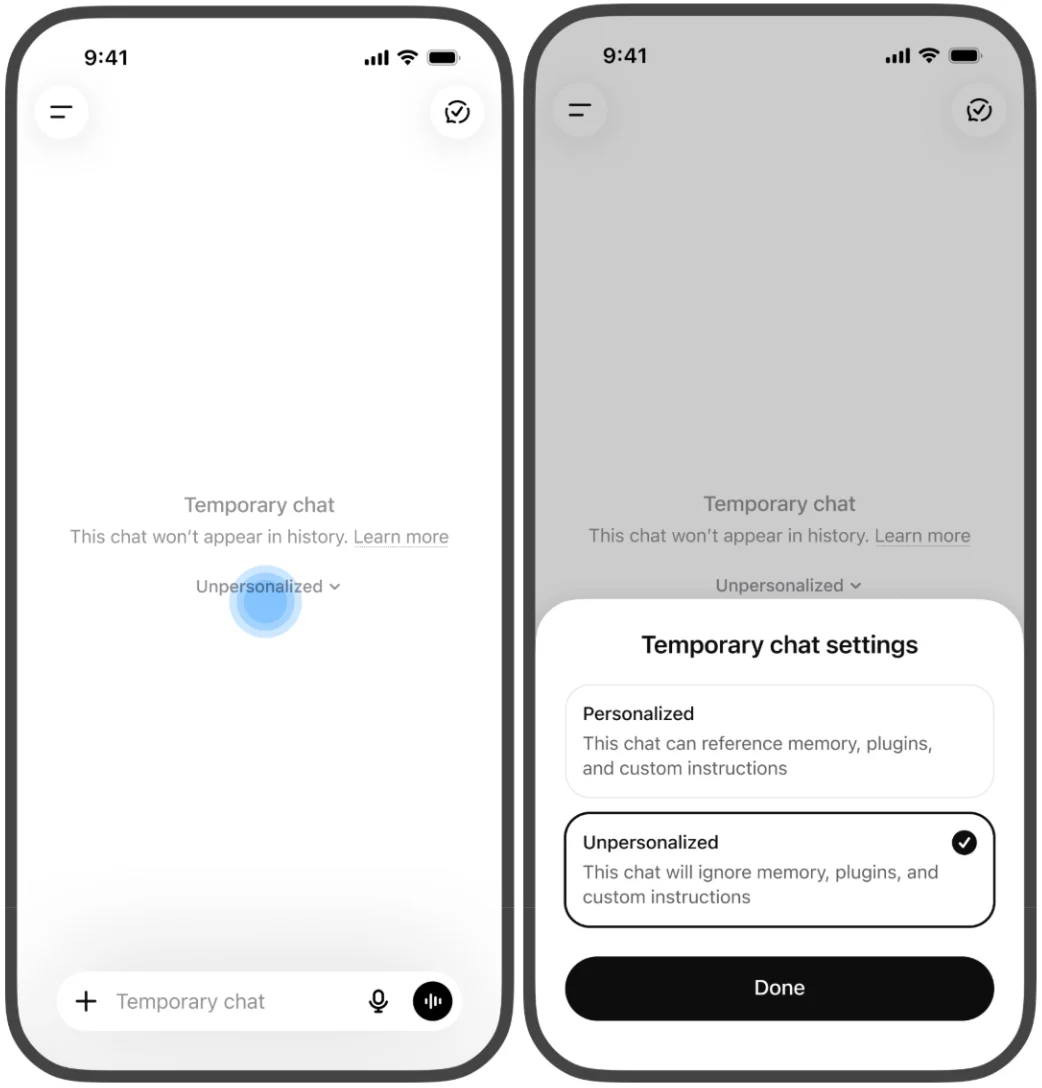
Private browsing alone does not turn off an assistant’s memory when you sign in. These settings reduce the influence of your history, but location and search settings can still affect the answer. ChatGPT search guidance.
Start a fresh conversation in your chosen mode for each question. Record any unavailable setting. Use public information only, without customer names or confidential documents.
2. Ask five realistic questions
Take Boreal Mechanical, a fictional commercial heat-pump installer in Ottawa. Replace the service, customer and city with your own. Name your business only in question 5:
- “Which companies install commercial heat pumps in Ottawa?”
- “I manage a small retail store in Ottawa. Who can install a commercial heat pump to replace my ageing heating system while keeping the store operating?”
- “Which commercial heat-pump installers in Ottawa show verifiable examples of work for small retailers? Provide sources and identify anything that needs confirmation.”
- “What should I compare before choosing a commercial heat-pump installer in Ottawa?”
- “What services does Boreal Mechanical offer, and which areas does it serve? Provide sources and identify anything you cannot confirm.”
The first three test discovery without naming the business. The fourth explores buying criteria. The fifth checks facts after you supply the name: appearing there does not establish that a customer would have found you unprompted.
What if you run an online store?
Adapt the same five questions to a product category and the region you ship to. For the first questions, describe the need without naming your store: “I need [product type] for [use], delivered to [region]. Which options should I compare? Give your sources.”
Distinguish what the assistant presents: your store, a brand you sell or an individual product. A cited brand does not prove that the assistant recommends your shop. Open the link too: does it lead to your store, the manufacturer or another merchant?
For the question naming your business, check whether the assistant describes your catalogue and delivery area correctly. A correct answer after you supply your name still does not establish that a buyer would have discovered you unprompted.
Do not follow up with “What about us?” to obtain a mention. Keep that exploration outside the test.
3. Repeat the test and save the answers
Ask all five questions in two assistants, then repeat in fresh conversations with the same wording, modes and search settings. Use a separate set for another language or market.
When available, request Web search and save the search activity, citations and source links the interface shows. An enabled setting does not establish that a search occurred. If you cannot confirm its use, record “unknown” and keep those answers separate from confirmed searches. The twenty observations are a small working sample, not a visibility percentage.
Some interfaces choose when to search: the new Claude experience has no search toggle. In Gemini, not every response displays sources. An absent link alone does not settle whether search was used.
Before closing each temporary conversation, save the answer and its links in a private document. You may not be able to retrieve it afterwards. Use one record per answer:
- Question, service, market and language.
- Date, time zone, assistant, model, account mode and Web search use.
- Business mentioned or recommended? Keep the relevant excerpt.
- Facts accurate, partial, wrong or unverifiable?
- Source URLs, claims checked and differences between runs.
- One correction or next check.
Download the blank observation sheet (.txt)
4. Keep the findings distinct
A mention means your name appears. A recommendation presents you as an option for the stated need. A citation links to a page offered as support. These signals can overlap.
An invented example: an answer cites Boreal Mechanical’s heat-pump guide but recommends two other installers. Its website is cited; the business is not recommended.
Open every source. Does it support the claim about the correct business, service and location? Is the information current? A homepage can establish that a business exists without confirming emergency availability. If you cannot verify a claim, record that without automatically treating it as false.
For more, see why AI-readable content is not always citable.
In your summary, prefer “The business appeared in both answers from assistant A to question 1” to “We rank well in AI.”
5. Choose one useful correction
Start with an error that could cost you a customer.
Suppose the assistant says you only serve homeowners, but you also work with shops. Check the cited page. If it describes residential work only, add a clear commercial-service section and a real project example, with permission where needed. Record the page you changed and the date. You have a specific improvement to check again.
If competitors keep appearing, examine the cited sources for gaps in your own public information. Do not assume those pages alone explain their presence.
If you are absent, do not conclude that you are technically blocked. Checking AI crawler access is a separate exercise.
Repeat the same questions after the correction. A changed answer does not prove your edit caused it, and no result guarantees a future recommendation. Zero visits from assistants in your analytics also does not mean zero mentions.
You finish with three things: saved answers, verified facts and a next action.
To examine your website’s public foundations too, try the free BREACH diagnostic. It examines your website and public signals, without testing assistant recommendations.
For a broader assessment of buying questions and a comparison with competitors, explore BREACH Pro.
Sources and scope. Temporary-mode instructions and visible search signals were checked against the linked provider documentation on October 28, 2026. Labels and availability can vary by account and interface. This guide describes a method; it does not report results from live assistant tests.
Choose an analysis that fits your decision
Breach Pro presents its scope, evidence and limits to help you choose a next step.
Explore Breach Pro